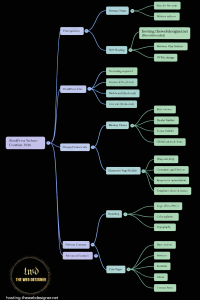

AI search is changing how people discover businesses, services, and answers online. If you’ve heard terms like AEO (Answer Engine Optimization) and GEO (Generative Engine Optimization), you’re not alone—these concepts are becoming part of everyday SEO conversations.
I’m Ahmed from TheWebDesigner.net. I build and optimize websites (mostly WordPress) for performance, visibility, and conversions. Lately, more clients ask the same question:
“How do I get my website mentioned in ChatGPT or included in Google AI Overviews?”
This article breaks it down in a practical way—without hype—so you can take action.
What AEO and GEO mean (and how they relate to SEO)
Answer Engine Optimization (AEO)
AEO focuses on structuring your pages so “answer engines” can easily extract the best response. That includes AI assistants and conversational search experiences.
Generative Engine Optimization (GEO)
GEO is about increasing the likelihood that generative AI tools reference your site as a source when they compose answers.
So… is SEO dead?
No. In most cases, AEO and GEO are an extension of traditional SEO, not a replacement.
Why? Because AI systems still rely heavily on:
- well-ranked pages,
- trustworthy sources,
- clean site architecture,
- and structured content.
A large study of Google AI Overviews (405,576 examples) found that 52% of sources mentioned in AI Overviews also rank in the top 10 organic results—meaning strong SEO is still a major advantage.
Is AI search replacing Google?
AI search usage is growing fast, but Google remains massive.
- Exploding Topics estimates ~16.4 billion Google searches per day.
- ChatGPT usage is enormous too (OpenAI has reported very large weekly active user numbers, and separate reporting indicates billions of daily prompts).
- A Higher Visibility survey reported most people still prefer classic search engines for general searches, while AI usage is rising—especially among younger groups.
Practical takeaway: optimize for both. The same high-quality SEO foundation powers results in Google and improves your chances in AI search.
How AI search chooses what to show (simplified)
When someone asks an AI tool a question, it typically:
- Identifies the intent (what the user really wants)
- Pulls from trusted information sources (often aligned with high-ranking content)
- Summarizes in natural language
- Sometimes cites sources (especially in experiences like Google AI Overviews)
For Google AI Overviews specifically, the system is designed to summarize answers and cite sources.
That leads to one rule you can build around:
If your page is hard to parse, hard to trust, or hard to crawl, it’s less likely to be used in AI answers.
The 4 pillars of AEO + GEO
1) Content that AI can quote easily
AI models prefer clear, natural language and question-based structure (because that mirrors how people ask questions).
What to do (AEO-ready content)
- Write H2/H3 headings as real questions:
- “What is Answer Engine Optimization (AEO)?”
- “How does Generative Engine Optimization (GEO) work?”
- Answer immediately under the heading (2–4 sentences)
- Then expand with details, examples, and steps
Use formats that AI loves
From large-scale analysis of AI Overviews, lists are extremely common in AI-generated answers.
So include:
- bullet lists for tips
- numbered steps for processes
- short definitions for key terms
- an FAQ section at the end
E-E-A-T is not optional
AI search heavily favors content that demonstrates:
- Experience
- Expertise
- Authoritativeness
- Trustworthiness
Do this by adding:
- author bio (who wrote it, why they know the topic)
- real-world experience (“what I do on client sites”)
- reputable citations for data claims (don’t guess numbers)
2) Technical SEO that makes your site accessible to AI
If AI tools can’t access or interpret your content, your rankings and citations suffer.
Crawlability checklist (don’t skip this)
- Check your robots.txt
- Ensure you’re not blocking important crawlers (Google’s crawlers, Bingbot, and relevant AI crawlers such as GPTBot / OAI-SearchBot)
- Submit your sitemap to search tools (Google Search Console + Bing Webmaster Tools)
OpenAI documents its crawlers and how site owners can manage access via robots.txt.
Keep important content in HTML (not hidden)
AI and search engines can struggle when key information is:
- only rendered after heavy JavaScript
- locked inside images
- available only in video with no transcript
Do this instead:
- keep core text in HTML
- add descriptive alt text
- publish transcripts for videos (exactly what you’re doing—good move)
Speed + structure still matter
A clean internal link structure and fast load time help both users and crawlers understand what’s important.
3) Schema Markup that removes ambiguity
Schema Markup (structured data) helps search engines and AI systems understand exactly what your page is about.
Think of Schema Markup as: “Here’s what this page is—and here are the key facts.”
Schema types that help most
- Organization schema (brand/entity)
- WebSite schema (site identity)
- Article schema (blog posts)
- FAQPage schema (FAQ sections)
- HowTo schema (step-by-step guides)
Schema Markup doesn’t guarantee placement, but it improves clarity and eligibility for rich results—especially when paired with strong content.
4) Authority signals that AI can trust
AI doesn’t evaluate your site in isolation. It also “notices” what the wider web says about you.
Practical GEO steps for authority
- earn quality backlinks (real editorial links, not spam)
- get mentions in reputable sites in your niche
- build consistent brand profiles (LinkedIn, business directories, etc.)
- collect real reviews where relevant
- maintain consistent name/logo/contact details
This supports your entity presence in knowledge graphs—which helps both search engines and AI systems “understand” your brand.
How to measure GEO / AEO success (realistically)
One frustration is that AI answers don’t always generate clicks. That’s true.
So instead of only tracking clicks, also track:
- brand mentions
- citations in AI results (when visible)
- growth in branded search
- assisted conversions (people who visit later via another channel)
Quick AEO + GEO checklist (copy/paste)
If you want a fast action list:
- Add question-based H2/H3 headings + direct answers
- Add an FAQ section (and FAQPage schema)
- Use bullets/steps/tables where helpful
- Add author bio + cite reputable sources (E-E-A-T)
- Confirm robots.txt allows key crawlers (Google, Bingbot, GPTBot/OAI-SearchBot)
- Ensure key content is in HTML (not hidden behind JS)
- Implement Schema Markup (Organization + Article + FAQPage)
- Strengthen internal linking and site speed
- Build off-site authority (mentions, links, profiles)
GET IN TOUCH
If you want help implementing AEO, GEO, Schema Markup, technical SEO, and AI-search-friendly content structure, contact me here:
FAQ (for “People Also Ask” + SEO)
What is AEO (Answer Engine Optimization)?
AEO is optimizing your content so answer engines can extract direct, accurate responses—using clear headings, short answers, and structured formatting.
What is GEO (Generative Engine Optimization)?
GEO focuses on increasing the chance your site is used as a trusted source when AI tools generate answers.
Does traditional SEO still matter for AI search?
Yes. Studies on Google AI Overviews show sources frequently overlap with strong organic rankings, so SEO remains the foundation.
What is Schema Markup and why does it matter?
Schema Markup is structured data that clarifies what your content represents (Article, FAQ, Organization, etc.). It helps machines interpret your page correctly.
Should I allow GPTBot in robots.txt?
It depends on your content strategy, but if your goal is AI visibility, you should understand OpenAI’s crawler controls and set robots.txt intentionally.