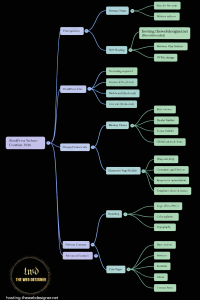

What are cookies? Cookies are small pieces of data that websites store in your browser so they can remember things like your login, preferences, and what you did on the site. They make browsing smoother—but some cookies can also be used for tracking, which is why cookie consent banners exist.
I’m Ahmed from TheWebDesigner.net (based in Europe). When I build websites—especially WordPress and e-commerce sites—cookies are always part of the setup: logins, shopping carts, analytics, ads, and the cookie banner itself. Done right, cookies improve user experience and trust. Done wrong, they can harm privacy, break compliance, and even slow down a website.
Let’s make cookies easy to understand.
What are cookies on a website (in plain language)?
A browser cookie (also called an internet cookie or HTTP cookie) is a small text file your browser saves after you visit a website. When you click to another page—or come back later—your browser sends that cookie back to the site, helping the site recognize your browser and continue your session.
Cookies are not “apps.” They don’t run software on your device. They are stored data that websites and browsers use to “remember” useful information.
How cookies work (quick step-by-step)
- You open a website. The website sends your browser one or more cookies.
- Your browser stores them on your device.
- When you navigate the site (or return later), your browser sends those cookies back.
- The website uses them to load the correct experience (logged in/out, language, cart, etc.).
What are cookies used for?
Most websites use cookies for four main reasons:
1) Login and security (session management)
Cookies help websites keep you logged in as you move from page to page—without asking for your password every time.
2) Preferences and personalization
Cookies can remember language, region, theme (dark mode), and other settings—so the site feels consistent.
3) Shopping carts and forms
If you add products to a cart, start a booking, or fill out a multi-step form, cookies often help store your progress.
4) Analytics and marketing
Cookies can measure what pages people visit and how they use a site. Marketing cookies can also support advertising and conversion measurement (this is where most privacy concerns appear).
Types of cookies you should know
Session cookies vs persistent cookies
-
- Session cookies: temporary; usually disappear when you close the browser.
- Persistent cookies: stay longer (until they expire or you delete them) and are used to remember logins/preferences over time.
First-party cookies vs third-party cookies
-
- First-party cookies are set by the website you’re visiting. They usually support core features (login, checkout, settings).
- Third-party cookies are set by other domains embedded on the page (often ads/trackers). These can follow users across multiple sites and are more privacy-sensitive.
Modern browsers increasingly restrict cross-site tracking, and Chrome has added protections that limit third-party cookie access in certain setups.
Important update: Google previously planned a broader phase-out of third-party cookies, but later changed course and kept user choice through browser settings instead of removing them entirely.
Essential vs non-essential cookies
You’ll often see categories in a cookie banner:
-
- Strictly necessary / essential (needed for the site to function)
- Preferences
- Statistics / analytics
- Marketing
In the EU, non-essential cookies generally require consent before they’re set.
Are cookies safe?
Most cookies are harmless and help websites function normally. The risks come from:
-
- Privacy tracking: third-party cookies (and similar tech) can build a profile of browsing behavior across sites.
- Session theft: if a session cookie is stolen (often via malware or insecure setups), attackers may hijack a login session.
- Shared devices: cookies can keep accounts signed in on a public or shared computer.
Why do websites ask you to accept cookies?
In many places, websites must be transparent about data collection and give users choices—especially for advertising and analytics cookies.
-
- In the EU, cookie consent is tied to privacy rules such as the GDPR and ePrivacy framework, requiring consent for non-essential cookies and clear information about their purpose.
- In California, consumers have the right to opt out of the “sale” or “sharing” of personal information (including sharing for cross-context behavioral advertising).
Should you accept cookies?
A practical approach (for most people):
-
- ✅ Allow essential cookies (otherwise logins, carts, and key features may break)
- ⚠️ Be selective with analytics (depends on trust and preference)
- ❌ Avoid marketing cookies if you don’t want tracking-based ads
If you’re visiting a site you don’t fully trust, choose the more privacy-friendly option (essential only).
How to delete cookies (and what happens if you do)
Deleting cookies can:
-
- log you out of websites
- reset preferences (language, theme)
- remove stored tracking identifiers
It’s useful when:
-
- A website behaves strangely (login loops, broken cart)
- You used a shared/public computer
- You want a privacy reset
Website-owner section (this is where I see most mistakes)
As a web designer, I’ve noticed most cookie problems come from how tracking scripts are installed, not from cookies themselves.
If you run a business website and you want trust + compliance + performance, here’s a practical checklist:
Cookie & tracking checklist for a modern website
-
- Audit what scripts you’re using (analytics, pixels, chat widgets, embeds)
- Use a proper cookie banner that blocks non-essential scripts until consent (EU-friendly approach)
- Provide clear categories: essential / analytics / marketing
- Add a Cookie Policy page explaining each category
- Make it easy to change consent later (not hidden)
- Keep the website fast: too many trackers can hurt speed and user trust
If you want, I can do a quick cookie + tracking audit for your site and recommend a clean setup that matches your goals (lead generation, bookings, e-commerce) without unnecessary tracking bloat.
Need a cookie banner on your website?
If you want a clean cookie consent setup (banner + categories + policy page) without slowing your site, message me here: Contact TheWebDesigner.net
How to clear cookies
Clearing cookies removes saved website data like sign-ins and preferences. It can fix login issues, reduce tracking, and solve broken carts—but it may log you out of some websites.
How to delete cookies
Deleting cookies is similar to clearing cookies. You can delete cookies for one site only (recommended) or delete all cookies (bigger reset).
How to enable cookies in Safari
If a website won’t let you log in or complete a checkout, cookies may be blocked. In Safari, allow cookies in the browser privacy settings, then refresh the page and try again.
How to clear cookies Safari
You can clear cookies in Safari from its privacy/history settings. After clearing cookies, reopen the website and sign in again if needed.
How to enable cookies in Firefox
If cookies are blocked in Firefox, some websites won’t remember logins or carts. Enable cookies in Firefox privacy settings (or allow cookies for a specific site), then reload the page.
FAQ
What are cookies in internet browsing?
Cookies are small pieces of data stored by your browser to help websites remember your session, settings, and actions (like keeping you logged in).
What are cookies on my phone?
They’re the same concept as on a computer—your mobile browser stores cookies so websites can remember you and your preferences.
Are cookies spyware?
Not automatically. Many cookies are necessary for websites to work. The privacy concern is mainly with tracking cookies and third-party tracking systems.
What happens if I block all cookies?
Some websites may break: logins might fail, carts may reset, and basic features can stop working. Blocking third-party cookies is often a better balance.